

How to enable the app embed on your store - NetWise Help Center
How to enable the app embed on your store
Please follow this simple step to enable the app embed.
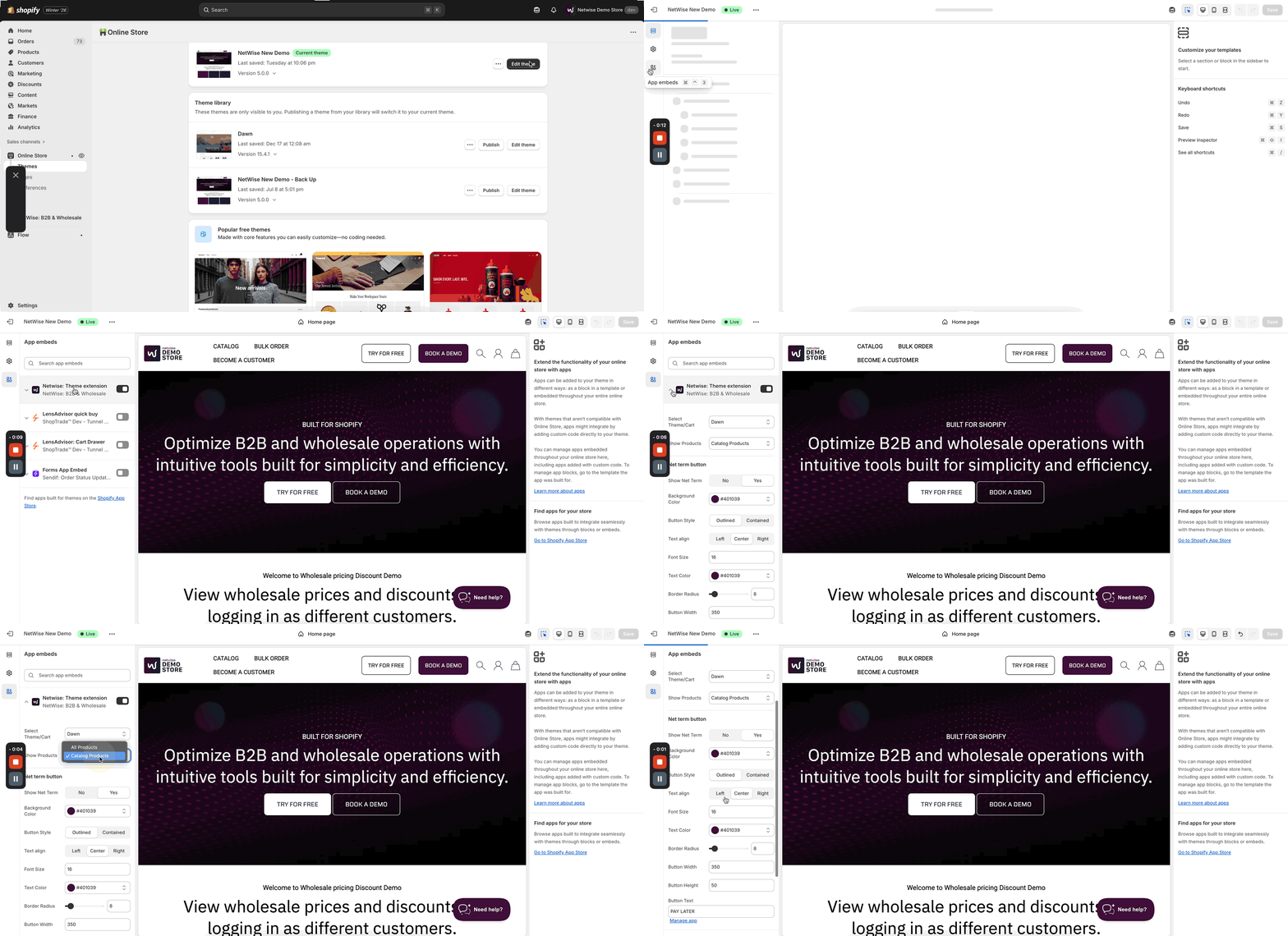
Go to Online Store → Themes → Edit theme → App embeds, then enable NetWise: Theme Extension → save
Before enabling, make sure you’ve selected the correct theme and configured any other required options, if applicable.
If your theme isn’t listed here, no worries just email us at [email protected] and we’ll add support for it within 12–24 working hours.
Note: The theme app embed is required to modify prices on the collection page, product page, search, and search results pages.
However, for the cart drawer, cart page, and checkout, the app embed and theme selection is not required price modifications in these areas work even without enabling the theme app embed.
Conclusion: Even without theme support, you can use our app, and all price modifications work seamlessly across the cart drawer, cart page, and checkout.
A detailed video guide on how to enable the app embed.
These themes are fully compatible with NetWise and automatically display wholesale or B2B pricing for logged-in customers no custom code or manual setup needed. NetWise follows Shopify’s standard guidelines and uses the Shopify App Embedded feature for a seamless, hassle-free integration.
List of themes: